Tuesday, May 5, 2020

JavaScript - LocalStorage


Methods available by localStorage Instance:


  • localStorage.setItem(key,value)
  • localStorage.getItem(key)
  • localStorage.removeItem(key)
  • localStorage.clear()

Saturday, April 4, 2020

Git - Installation

To install GIT - visit the following link for instructions:
https://git-scm.com/download/

For installation on Linux follow instuctions at the following link:
https://git-scm.com/download/linux

Monday, March 30, 2020

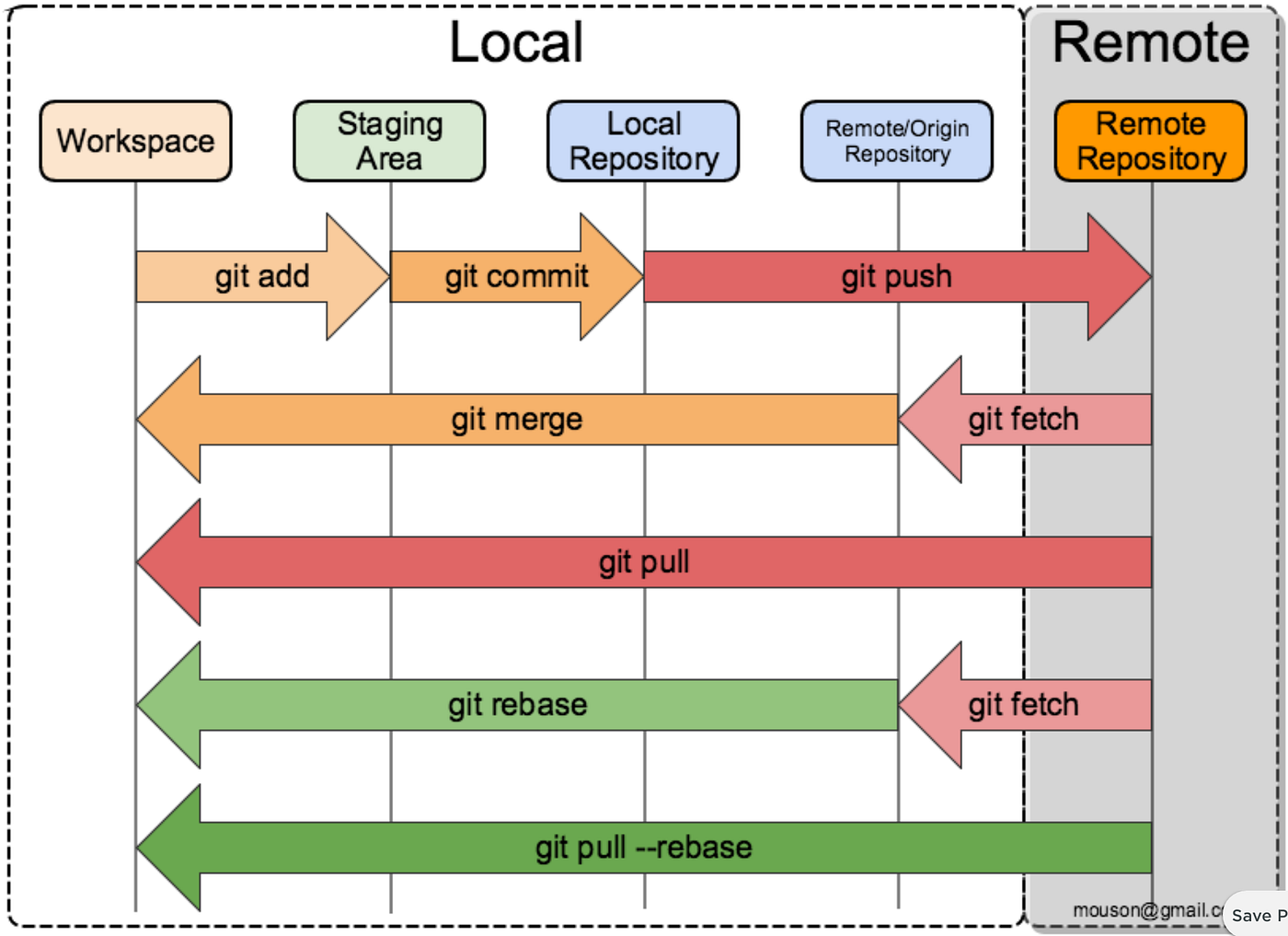
Git - 3 main states of artifact

Modified - Artifact is undergoing user modifications.
Staged - User had marked the modified file to go to the next stage. The is achieved by add command.
Commited - The artificat is safely stored in the local git database. This is acheived by commit command.


Thursday, March 12, 2020

Rust - Install Ubuntu Linux

To Install Rust in Ubuntu. Follow the instructions at the link:
https://www.rust-lang.org/tools/install

Step 1: Run the curl command.

$ curl --proto '=https' --tlsv1.2 -sSf https://sh.rustup.rs | sh
info: downloading installer

Welcome to Rust!

This will download and install the official compiler for the Rust
programming language, and its package manager, Cargo.

It will add the cargo, rustc, rustup and other commands to
Cargo's bin directory, located at:

  /home/ubuntu/.cargo/bin

This can be modified with the CARGO_HOME environment variable.

Rustup metadata and toolchains will be installed into the Rustup
home directory, located at:

  /home/ubuntu/.rustup

This can be modified with the RUSTUP_HOME environment variable.

This path will then be added to your PATH environment variable by
modifying the profile file located at:

  /home/ubuntu/.profile

You can uninstall at any time with rustup self uninstall and
these changes will be reverted.

Current installation options:


   default host triple: x86_64-unknown-linux-gnu
     default toolchain: stable
               profile: default
  modify PATH variable: yes

1) Proceed with installation (default)
2) Customize installation
3) Cancel installation
>1

info: profile set to 'default'
info: default host triple is x86_64-unknown-linux-gnu
info: syncing channel updates for 'stable-x86_64-unknown-linux-gnu'
info: latest update on 2020-02-27, rust version 1.41.1 (f3e1a954d 2020-02-24)
info: downloading component 'cargo'
info: downloading component 'clippy'
info: downloading component 'rust-docs'
 12.0 MiB /  12.0 MiB (100 %)  11.1 MiB/s in  1s ETA:  0s
info: downloading component 'rust-std'
 17.7 MiB /  17.7 MiB (100 %)  11.2 MiB/s in  1s ETA:  0s
info: downloading component 'rustc'
 58.0 MiB /  58.0 MiB (100 %)  11.2 MiB/s in  5s ETA:  0s
info: downloading component 'rustfmt'
info: installing component 'cargo'
info: installing component 'clippy'
info: installing component 'rust-docs'
 12.0 MiB /  12.0 MiB (100 %)   8.5 MiB/s in  1s ETA:  0s
info: installing component 'rust-std'
info: installing component 'rustc'
 58.0 MiB /  58.0 MiB (100 %)  13.4 MiB/s in  4s ETA:  0s
info: installing component 'rustfmt'
info: default toolchain set to 'stable'

  stable installed - rustc 1.41.1 (f3e1a954d 2020-02-24)


Rust is installed now. Great!

To get started you need Cargo's bin directory ($HOME/.cargo/bin) in your PATH
environment variable. Next time you log in this will be done
automatically.

To configure your current shell run source $HOME/.cargo/env
$

Step 2: Check for Rust:
$ which rustc

Step 3: Since, it resulted in no output. That means Rust compiler is notavailable

Step 4: On running the source command the rust compiler is available.

$ source $HOME/.cargo/env
$ which rustc
/home/mhc/.cargo/bin/rustc

Wednesday, January 22, 2020

Docker - Install nginx


Download, install and start a container running NGINX

$ sudo docker run --detach --name web nginx:latest
Unable to find image 'nginx:latest' locally
latest: Pulling from library/nginx
8ec398bc0356: Pull complete
dfb2a46f8c2c: Pull complete
b65031b6a2a5: Pull complete
Digest: sha256:80a88760216ae16b13d9a9ce0267740d2de3506cbf1cab29072b1532dedd1ecb
Status: Downloaded newer image for nginx:latest
11292f469c3db9b1a1ec66cf46d5133803be823bbd89e91613d39133757436a1


Check if nginx process has started

$ ps aux | head -1; ps aux | grep nginx
USER       PID %CPU %MEM    VSZ   RSS TTY      STAT START   TIME COMMAND
root      7632  0.1  0.0  10632  5540 ?        Ss   12:18   0:00 nginx: master process nginx -g daemon off;
systemd+  7691  0.0  0.0  11088  2664 ?        S    12:18   0:00 nginx: worker process


Check Docker running Process:

$ sudo docker ps
CONTAINER ID        IMAGE               COMMAND                  CREATED             STATUS              PORTS               NAMES
11292f469c3d        nginx:latest        "nginx -g 'daemon of…"   2 hours ago         Up 2 hours          80/tcp              web


Tuesday, October 15, 2019

Golang - Install Gonum

Install gonum plotting library in ubuntu:

$ go get -v gonum.org/v1/plot/...
Fetching https://gonum.org/v1/plot?go-get=1
Parsing meta tags from https://gonum.org/v1/plot?go-get=1 (status code 404)
get "gonum.org/v1/plot": found meta tag get.metaImport{Prefix:"gonum.org/v1/plot", VCS:"git", RepoRoot:"https://github.com/gonum/plot"} at https://gonum.org/v1/plot?go-get=1
gonum.org/v1/plot (download)
github.com/golang/freetype (download)
Fetching https://golang.org/x/image/math/fixed?go-get=1
Parsing meta tags from https://golang.org/x/image/math/fixed?go-get=1 (status code 200)
get "golang.org/x/image/math/fixed": found meta tag get.metaImport{Prefix:"golang.org/x/image", VCS:"git", RepoRoot:"https://go.googlesource.com/image"} at https://golang.org/x/image/math/fixed?go-get=1
get "golang.org/x/image/math/fixed": verifying non-authoritative meta tag
Fetching https://golang.org/x/image?go-get=1
Parsing meta tags from https://golang.org/x/image?go-get=1 (status code 200)
golang.org/x/image (download)
Fetching https://golang.org/x/image/font?go-get=1
Parsing meta tags from https://golang.org/x/image/font?go-get=1 (status code 200)
get "golang.org/x/image/font": found meta tag get.metaImport{Prefix:"golang.org/x/image", VCS:"git", RepoRoot:"https://go.googlesource.com/image"} at https://golang.org/x/image/font?go-get=1
get "golang.org/x/image/font": verifying non-authoritative meta tag
github.com/fogleman/gg (download)
Fetching https://golang.org/x/image/tiff?go-get=1
Parsing meta tags from https://golang.org/x/image/tiff?go-get=1 (status code 200)
get "golang.org/x/image/tiff": found meta tag get.metaImport{Prefix:"golang.org/x/image", VCS:"git", RepoRoot:"https://go.googlesource.com/image"} at https://golang.org/x/image/tiff?go-get=1
get "golang.org/x/image/tiff": verifying non-authoritative meta tag
github.com/ajstarks/svgo (download)
Fetching https://rsc.io/pdf?go-get=1
Parsing meta tags from https://rsc.io/pdf?go-get=1 (status code 200)
get "rsc.io/pdf": found meta tag get.metaImport{Prefix:"rsc.io/pdf", VCS:"git", RepoRoot:"https://github.com/rsc/pdf"} at https://rsc.io/pdf?go-get=1
rsc.io/pdf (download)
golang.org/x/image/math/f64
gonum.org/v1/plot/palette
golang.org/x/image/math/fixed
golang.org/x/image/tiff/lzw
github.com/ajstarks/svgo
gonum.org/v1/plot/vg/fonts
github.com/golang/freetype/raster
golang.org/x/image/font
golang.org/x/image/draw
golang.org/x/image/font/basicfont
golang.org/x/image/ccitt
github.com/golang/freetype/truetype
rsc.io/pdf
gonum.org/v1/plot/palette/brewer
golang.org/x/image/tiff
gonum.org/v1/plot/palette/moreland
gonum.org/v1/plot/vg
gonum.org/v1/plot/cmpimg
github.com/fogleman/gg
gonum.org/v1/plot/vg/vgeps
gonum.org/v1/plot/vg/vgsvg
gonum.org/v1/plot/vg/vgpdf
gonum.org/v1/plot/vg/recorder
gonum.org/v1/plot/tools/bezier
gonum.org/v1/plot/vg/vgtex
gonum.org/v1/plot/vg/vgimg
gonum.org/v1/plot/vg/draw
gonum.org/v1/plot
gonum.org/v1/plot/plotter
gonum.org/v1/plot/gob
gonum.org/v1/plot/plotutil
$

References: