Sunday, May 3, 2020

Saturday, April 4, 2020
Git - Installation
To install GIT - visit the following link for instructions:
https://git-scm.com/download/
For installation on Linux follow instuctions at the following link:
https://git-scm.com/download/linux
https://git-scm.com/download/
For installation on Linux follow instuctions at the following link:
https://git-scm.com/download/linux
Monday, March 30, 2020
Git - 3 main states of artifact
Modified - Artifact is undergoing user modifications.
Staged - User had marked the modified file to go to the next stage. The is achieved by add command.
Commited - The artificat is safely stored in the local git database. This is acheived by commit command.
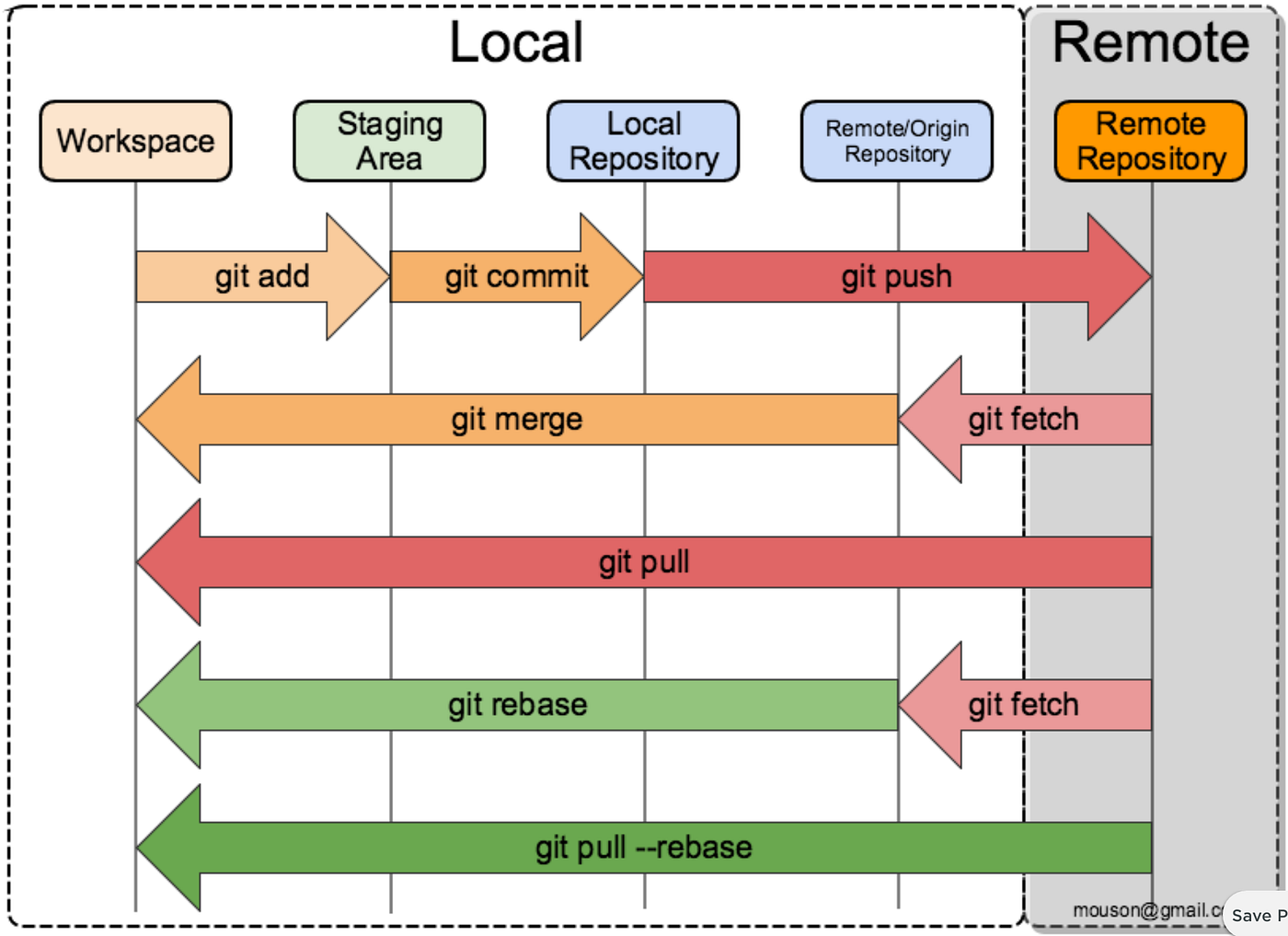
Staged - User had marked the modified file to go to the next stage. The is achieved by add command.
Commited - The artificat is safely stored in the local git database. This is acheived by commit command.
Thursday, March 12, 2020
Rust - Install Ubuntu Linux
To Install Rust in Ubuntu. Follow the instructions at the link:
https://www.rust-lang.org/tools/install
Step 1: Run the curl command.
$ curl --proto '=https' --tlsv1.2 -sSf https://sh.rustup.rs | sh
info: downloading installer
Welcome to Rust!
This will download and install the official compiler for the Rust
programming language, and its package manager, Cargo.
It will add the cargo, rustc, rustup and other commands to
Cargo's bin directory, located at:
/home/ubuntu/.cargo/bin
This can be modified with the CARGO_HOME environment variable.
Rustup metadata and toolchains will be installed into the Rustup
home directory, located at:
/home/ubuntu/.rustup
This can be modified with the RUSTUP_HOME environment variable.
This path will then be added to your PATH environment variable by
modifying the profile file located at:
/home/ubuntu/.profile
You can uninstall at any time with rustup self uninstall and
these changes will be reverted.
Current installation options:
default host triple: x86_64-unknown-linux-gnu
default toolchain: stable
profile: default
modify PATH variable: yes
1) Proceed with installation (default)
2) Customize installation
3) Cancel installation
>1
info: profile set to 'default'
info: default host triple is x86_64-unknown-linux-gnu
info: syncing channel updates for 'stable-x86_64-unknown-linux-gnu'
info: latest update on 2020-02-27, rust version 1.41.1 (f3e1a954d 2020-02-24)
info: downloading component 'cargo'
info: downloading component 'clippy'
info: downloading component 'rust-docs'
12.0 MiB / 12.0 MiB (100 %) 11.1 MiB/s in 1s ETA: 0s
info: downloading component 'rust-std'
17.7 MiB / 17.7 MiB (100 %) 11.2 MiB/s in 1s ETA: 0s
info: downloading component 'rustc'
58.0 MiB / 58.0 MiB (100 %) 11.2 MiB/s in 5s ETA: 0s
info: downloading component 'rustfmt'
info: installing component 'cargo'
info: installing component 'clippy'
info: installing component 'rust-docs'
12.0 MiB / 12.0 MiB (100 %) 8.5 MiB/s in 1s ETA: 0s
info: installing component 'rust-std'
info: installing component 'rustc'
58.0 MiB / 58.0 MiB (100 %) 13.4 MiB/s in 4s ETA: 0s
info: installing component 'rustfmt'
info: default toolchain set to 'stable'
stable installed - rustc 1.41.1 (f3e1a954d 2020-02-24)
Rust is installed now. Great!
To get started you need Cargo's bin directory ($HOME/.cargo/bin) in your PATH
environment variable. Next time you log in this will be done
automatically.
To configure your current shell run source $HOME/.cargo/env
$
Step 2: Check for Rust:
$ which rustc
Step 3: Since, it resulted in no output. That means Rust compiler is notavailable
Step 4: On running the source command the rust compiler is available.
$ source $HOME/.cargo/env
$ which rustc
/home/mhc/.cargo/bin/rustc
https://www.rust-lang.org/tools/install
Step 1: Run the curl command.
$ curl --proto '=https' --tlsv1.2 -sSf https://sh.rustup.rs | sh
info: downloading installer
Welcome to Rust!
This will download and install the official compiler for the Rust
programming language, and its package manager, Cargo.
It will add the cargo, rustc, rustup and other commands to
Cargo's bin directory, located at:
/home/ubuntu/.cargo/bin
This can be modified with the CARGO_HOME environment variable.
Rustup metadata and toolchains will be installed into the Rustup
home directory, located at:
/home/ubuntu/.rustup
This can be modified with the RUSTUP_HOME environment variable.
This path will then be added to your PATH environment variable by
modifying the profile file located at:
/home/ubuntu/.profile
You can uninstall at any time with rustup self uninstall and
these changes will be reverted.
Current installation options:
default host triple: x86_64-unknown-linux-gnu
default toolchain: stable
profile: default
modify PATH variable: yes
1) Proceed with installation (default)
2) Customize installation
3) Cancel installation
>1
info: profile set to 'default'
info: default host triple is x86_64-unknown-linux-gnu
info: syncing channel updates for 'stable-x86_64-unknown-linux-gnu'
info: latest update on 2020-02-27, rust version 1.41.1 (f3e1a954d 2020-02-24)
info: downloading component 'cargo'
info: downloading component 'clippy'
info: downloading component 'rust-docs'
12.0 MiB / 12.0 MiB (100 %) 11.1 MiB/s in 1s ETA: 0s
info: downloading component 'rust-std'
17.7 MiB / 17.7 MiB (100 %) 11.2 MiB/s in 1s ETA: 0s
info: downloading component 'rustc'
58.0 MiB / 58.0 MiB (100 %) 11.2 MiB/s in 5s ETA: 0s
info: downloading component 'rustfmt'
info: installing component 'cargo'
info: installing component 'clippy'
info: installing component 'rust-docs'
12.0 MiB / 12.0 MiB (100 %) 8.5 MiB/s in 1s ETA: 0s
info: installing component 'rust-std'
info: installing component 'rustc'
58.0 MiB / 58.0 MiB (100 %) 13.4 MiB/s in 4s ETA: 0s
info: installing component 'rustfmt'
info: default toolchain set to 'stable'
stable installed - rustc 1.41.1 (f3e1a954d 2020-02-24)
Rust is installed now. Great!
To get started you need Cargo's bin directory ($HOME/.cargo/bin) in your PATH
environment variable. Next time you log in this will be done
automatically.
To configure your current shell run source $HOME/.cargo/env
$
Step 2: Check for Rust:
$ which rustc
Step 3: Since, it resulted in no output. That means Rust compiler is notavailable
Step 4: On running the source command the rust compiler is available.
$ source $HOME/.cargo/env
$ which rustc
/home/mhc/.cargo/bin/rustc
Wednesday, January 22, 2020
Docker - Install nginx
Download, install and start a container running NGINX
$ sudo docker run --detach --name web nginx:latest
Unable to find image 'nginx:latest' locally
latest: Pulling from library/nginx
8ec398bc0356: Pull complete
dfb2a46f8c2c: Pull complete
b65031b6a2a5: Pull complete
Digest: sha256:80a88760216ae16b13d9a9ce0267740d2de3506cbf1cab29072b1532dedd1ecb
Status: Downloaded newer image for nginx:latest
11292f469c3db9b1a1ec66cf46d5133803be823bbd89e91613d39133757436a1
Check if nginx process has started
$ ps aux | head -1; ps aux | grep nginx
USER PID %CPU %MEM VSZ RSS TTY STAT START TIME COMMAND
root 7632 0.1 0.0 10632 5540 ? Ss 12:18 0:00 nginx: master process nginx -g daemon off;
systemd+ 7691 0.0 0.0 11088 2664 ? S 12:18 0:00 nginx: worker process
Check Docker running Process:
$ sudo docker ps
CONTAINER ID IMAGE COMMAND CREATED STATUS PORTS NAMES
11292f469c3d nginx:latest "nginx -g 'daemon of…" 2 hours ago Up 2 hours 80/tcp web
Tuesday, October 15, 2019
Golang - Install Gonum
Install gonum plotting library in ubuntu:
References:
$ go get -v gonum.org/v1/plot/...
Fetching https://gonum.org/v1/plot?go-get=1
Parsing meta tags from https://gonum.org/v1/plot?go-get=1 (status code 404)
get "gonum.org/v1/plot": found meta tag get.metaImport{Prefix:"gonum.org/v1/plot", VCS:"git", RepoRoot:"https://github.com/gonum/plot"} at https://gonum.org/v1/plot?go-get=1
gonum.org/v1/plot (download)
github.com/golang/freetype (download)
Fetching https://golang.org/x/image/math/fixed?go-get=1
Parsing meta tags from https://golang.org/x/image/math/fixed?go-get=1 (status code 200)
get "golang.org/x/image/math/fixed": found meta tag get.metaImport{Prefix:"golang.org/x/image", VCS:"git", RepoRoot:"https://go.googlesource.com/image"} at https://golang.org/x/image/math/fixed?go-get=1
get "golang.org/x/image/math/fixed": verifying non-authoritative meta tag
Fetching https://golang.org/x/image?go-get=1
Parsing meta tags from https://golang.org/x/image?go-get=1 (status code 200)
golang.org/x/image (download)
Fetching https://golang.org/x/image/font?go-get=1
Parsing meta tags from https://golang.org/x/image/font?go-get=1 (status code 200)
get "golang.org/x/image/font": found meta tag get.metaImport{Prefix:"golang.org/x/image", VCS:"git", RepoRoot:"https://go.googlesource.com/image"} at https://golang.org/x/image/font?go-get=1
get "golang.org/x/image/font": verifying non-authoritative meta tag
github.com/fogleman/gg (download)
Fetching https://golang.org/x/image/tiff?go-get=1
Parsing meta tags from https://golang.org/x/image/tiff?go-get=1 (status code 200)
get "golang.org/x/image/tiff": found meta tag get.metaImport{Prefix:"golang.org/x/image", VCS:"git", RepoRoot:"https://go.googlesource.com/image"} at https://golang.org/x/image/tiff?go-get=1
get "golang.org/x/image/tiff": verifying non-authoritative meta tag
github.com/ajstarks/svgo (download)
Fetching https://rsc.io/pdf?go-get=1
Parsing meta tags from https://rsc.io/pdf?go-get=1 (status code 200)
get "rsc.io/pdf": found meta tag get.metaImport{Prefix:"rsc.io/pdf", VCS:"git", RepoRoot:"https://github.com/rsc/pdf"} at https://rsc.io/pdf?go-get=1
rsc.io/pdf (download)
golang.org/x/image/math/f64
gonum.org/v1/plot/palette
golang.org/x/image/math/fixed
golang.org/x/image/tiff/lzw
github.com/ajstarks/svgo
gonum.org/v1/plot/vg/fonts
github.com/golang/freetype/raster
golang.org/x/image/font
golang.org/x/image/draw
golang.org/x/image/font/basicfont
golang.org/x/image/ccitt
github.com/golang/freetype/truetype
rsc.io/pdf
gonum.org/v1/plot/palette/brewer
golang.org/x/image/tiff
gonum.org/v1/plot/palette/moreland
gonum.org/v1/plot/vg
gonum.org/v1/plot/cmpimg
github.com/fogleman/gg
gonum.org/v1/plot/vg/vgeps
gonum.org/v1/plot/vg/vgsvg
gonum.org/v1/plot/vg/vgpdf
gonum.org/v1/plot/vg/recorder
gonum.org/v1/plot/tools/bezier
gonum.org/v1/plot/vg/vgtex
gonum.org/v1/plot/vg/vgimg
gonum.org/v1/plot/vg/draw
gonum.org/v1/plot
gonum.org/v1/plot/plotter
gonum.org/v1/plot/gob
gonum.org/v1/plot/plotutil
$
References:
Wednesday, October 9, 2019
angular - install angular cli on ubunut using npm
Installing angular cli on ubuntu using npm
~$ npm install -g @angular/cli
/home/ubuntu/.nvm/versions/node/v10.16.3/bin/ng -> /home/ubuntu/.nvm/versions/node/v10.16.3/lib/node_modules/@angular/cli/bin/ng
> @angular/cli@8.3.8 postinstall /home/ubuntu/.nvm/versions/node/v10.16.3/lib/node_modules/@angular/cli
> node ./bin/postinstall/script.js
? Would you like to share anonymous usage data with the Angular Team at Google under
Google’s Privacy Policy at https://policies.google.com/privacy? For more details and
how to change this setting, see http://angular.io/analytics. Yes
Thank you for sharing anonymous usage data. If you change your mind, the following
command will disable this feature entirely:
ng analytics off
+ @angular/cli@8.3.8
added 244 packages from 185 contributors in 1178.698s
~$
Subscribe to:
Posts (Atom)